Objects are categorized by type in the Find by Name or Catalog Number list on the Advanced tab of the Find window.
A simple way to find any object is to first determine its type (is the object a star, galaxy, cluster or other?). Next, determine what catalog you want to search and then select the name of the object from the catalog list. The table below lists each category in the Find tree list.
|
Object Type |
Catalog/Cross Reference |
Description |
|
Asterisms |
|
Lists the names of many common asterisms.
|
|
Constellations |
|
Lists the names of the 88 constellations.
|
|
Non-stellar Objects |
|
Lists databases of non-stellar objects.
|
|
Caldwell |
Caldwell Catalog objects.
|
|
|
Common Names |
Names of common non-stellar objects.
|
|
|
Herschel |
Herschel 400 catalog. |
|
|
IC |
Index Catalog. |
|
|
Lorenzin |
Tomm Lorenzin Catalog. |
|
|
Messier |
Messier Catalog. |
|
|
NGC |
New General Catalogue. |
|
|
PGC |
||
|
PGC cross reference |
Cross references to the Principal Catalog of Galaxies. |
|
|
PLN |
Planetary Nebulae. |
|
|
SAC* |
Saguaro Astronomy Club Deep Space Object catalog. |
|
|
Sky Databases (SDBs) |
Optional (non-core) databases |
These optional Sky Databases (SDBs) can be turned on from the Database Manager command in the Input menu.
|
|
Solar System |
|
Objects within our solar system.
|
|
Meteor Shower Radiants
|
Locations of meteor showers. |
|
|
Moon |
Earth’s Moon.
|
|
|
Planets (alphabetical) |
Earth Jupiter Mars Mercury Neptune Saturn Uranus Venus
|
|
|
Satellites |
Man-made satellites that have been imported from the Satellites window on the Input menu.
|
|
|
Small Solar System Bodies |
Objects that are classified as Small Solar System Bodies by the IAU. |
|
|
|
||
|
Asteroids (Large Database): Names of asteroids that have been imported from the Large Database tab on the Small Solar System Bodies windows (Input menu).
|
||
|
Asteroids (Small Database): Names of asteroids that have been imported from the Small Database tab on the Small Solar System Bodies windows (Input menu).
|
||
|
|
Comets: Names of comets selected in the Comet tab on the Small Solar System Objects window (Input menu).
|
|
|
Dwarf Planets |
Pluto
|
|
|
Sun |
The Sun.
|
|
|
Stellar Objects |
|
Lists databases of stars.
|
|
Bayer |
Bayer catalog designations. |
|
|
Common name |
Common star names. |
|
|
DM |
Bonner Durchmusterung number. |
|
|
Flamsteed |
Flamsteed designations. |
|
|
GCVS |
General Catalog of Variable Stars. |
|
|
GSC |
Guide Star Catalog. |
|
|
HD |
Henry Draper Number. |
|
|
NSV |
Catalog of Variable Stars. |
|
|
SAO |
Smithsonian Astrophysical Observatory. |
|
|
Struve |
Struve Catalog stars. |
|
|
WDS |
Washington Double Star catalog. |
The Saguaro Astronomy Club Database contains cross references to the astronomical catalogs in the table below.
To locate objects in the SAC, in the Search For text input on the Find window, enter SAC <Cross Reference> <Catalog Number> and then click the Find button. For example, entering the text SAC Cr 33 locates this open cluster in the Collinder catalog.
Another way to find an object is to enter its catalog designation. Leading zeroes are not required; the search routine automatically adds them. Typing just the catalog abbreviation (with no number) lists the first 10 items in the catalog
The Tycho catalog’s designers indexed it with the corresponding GSC numbers. We have therefore not included it as a searchable catalog.
Objects can be located using catalog designations that are cross referenced to the source catalog. The table below lists the available cross-reference catalogs and their prefixes, along with the number of galaxies in the catalog (Count) and an example of the correct format to use when search for an object in this catalog.
See “Catalog Cross References” in “Appendix A: Databases and Cross References” on page 784 for a list of these catalogs.
The following tables show a variety of useful search queries for the Locate By Name text box.
|
Star Name |
Type of Query |
|
Polaris |
Common star name |
|
SAO 308 |
Smithsonian Astrophysical Observatory star |
|
GSC 4628:237 |
Guide Star Catalog number |
|
HIP 11767 |
Hipparcos identifier |
|
PPM 431 |
Positions and Proper Motions (PPM) number |
|
HD 8890 |
Henry Draper number |
|
B+88 8 |
Bonner Durchmusterung catalog |
|
C-34 12784 |
Cordoba Durchmusterung catalog |
|
P-42 7856 |
Cape Durchmusterung catalog |
|
Flamsteed/Bayer (use constellation abbreviation) |
Result |
|
ALPHA UMI |
(Alpha Ursae Minoris) |
|
25 PSI 1 ORI |
25 Psi 1 Orionis |
|
Non-stellar Objects |
Result |
|
Great Nebula in Andromeda |
Common non-stellar object name |
|
M31 |
M31 Messier Object |
|
NGC 224 |
NGC 224 in the New General Catalog |
|
IC 434 |
IC 434 in the Index Catalog |
|
PGC 18508 |
Principal Galaxies Catalog |
|
GCVS GK ORI |
General Catalog of Variable Stars |
|
NSV |
New Suspected Variable Catalog |
|
PLN 194+2.1 |
Planetary Nebula |
|
Solar System Objects |
Result |
|
Saturn |
Finds Saturn |
|
Wild 4 |
Finds the comet named "Wild 4" |
|
Ceres |
Finds small database asteroid named "1 Ceres" |
|
MPL 835 OLIVIA |
"MPL" prefix finds that asteroid (or minor planet) named "835 Olivia" from the large asteroid database. |
|
Uranometria Star Charts |
Result |
|
URA 36 |
Centers on Uranometria star chart number 36 |
|
URA 36+ |
Centers on Uranometria star chart number 36 and sets Uranometria-like chart attributes. |
|
Satellites/Spacecraft |
Result |
|
SAT COSMOS 100 |
Searches for the satellite named "Cosmos 100" |
|
Miscellaneous Objects |
Result |
|
Zenith |
Moves to 90 degrees altitude |
|
AAVSO A |
Sets field width to AAVSO type A (accepts a-g) |
|
RA decimal hours, Dec decimal degrees |
Enter any RA, Dec coordinate pair, separated by a comma and in decimal format and click the Find button to locate this position on the Sky Chart and display information about it in the Object Information window.
For example, enter 12.3, 13.4 to locate this coordinate on the Sky Chart. |
|
RA hours RA minutes RA seconds, Dec degrees Dec minutes Dec seconds
|
Enter any RA, Dec (2000.0) coordinate pair, separated by a comma, in sexagesimal format, and click the Find button to locate this position on the Sky Chart display information about it in the Object Information window.
For example, enter 10h 26m 36.2s, 40d 20m 22.8s to locate this coordinate on the Sky Chart. See Finding by Equatorial Coordinate below for more information.
|
|
Z2.5 |
Zooms to a 2.5-degree field of view |
|
Z2.5m |
Zooms to a 2.5-minute field of view |
|
Z200s |
Zooms to 200 arcsecond field of view |
|
SCALE 2.5 |
Adjusts the sky chart so that the scale is 2.5 arcseconds/pixel |
The Sky Chart can be centered on a RA, Dec coordinate (2000.0) using either decimal or sexagesimal format.
Enter any RA, Dec coordinate pair, separated by a comma and in decimal format and click the Find button to locate this position on the Sky Chart and display information about it in the Object Information window.
For example, enter 12.38893, 13.43345 and then click the Find button to locate this coordinate on the Sky Chart.
Enter any RA, Dec coordinate pair, separated by a comma, in sexagesimal format:
UUh VVm WWs, XXd YYm ZZs
Each component is described in the table below.
|
Designation |
Description |
|
UU
|
A number between 0-23 specifying the hours of RA. |
|
h
|
The lower-case letter “h” specifying the preceding number is RA hours. |
|
VV
|
A number between 0-59 specifying the minutes of RA. |
|
m
|
The lower-case letter “m” specifying the preceding number is RA minutes. |
|
WW
|
A number between 0-59.99999 specifying the seconds of RA. |
|
s |
The lower-case letter “s” specifying the preceding number is RA seconds,
|
|
, |
A comma character (“,”) separates the RA coordinate from the Dec coordinate.
|
|
XX
|
A number between 0-89 specifying the degrees of declination. |
|
d |
The lower-case letter “d” specifying the preceding number represents degrees of declination.
|
|
YY |
A number between 0-59 specifying the minutes of declination.
|
|
m |
The lower-case letter “m” specifying the preceding number represents arcminutes of declination. |
|
ZZ |
A number between 0-59.99 specifying the seconds of declination.
|
|
s |
The second lower-case letter “s” specifies the preceding number represents arcseconds of declination.
|
Here is an example sexagesimal format:
10h 12m 32.22s, -80d 12m 44.3s
My Chart Elements must be located using the Input > My Chart Elements command. On the My Chart Elements window, highlight the desired element, and click the Center button. See page 84 for more information.
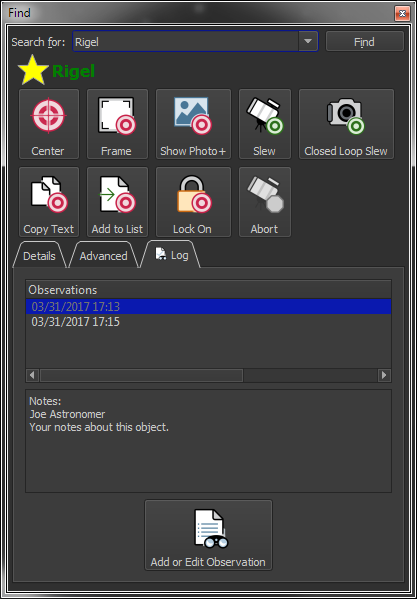
Click the Log tab on the Find window to view the observing log and notes for this object.
Figure 35: The Log tab on the Find window showing an observation notes for a star.

Click the Add or Edit Observations button to show the Observer Log window that allows you to add notes, a seeing scale, rating, and other information for the current object, and view a table of your observations.

Note: The object observed graphic (above) appears on the Log tab for objects that have a recorded observation.
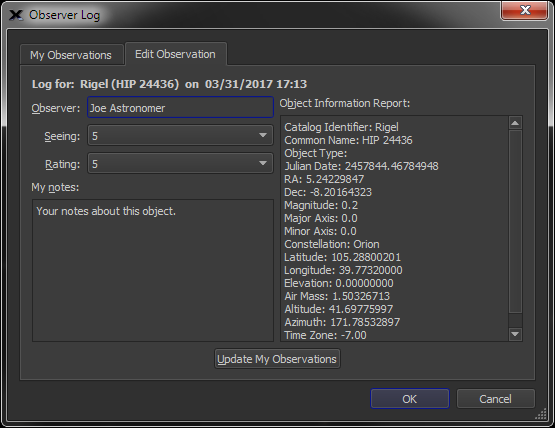
Figure 36: Observer Log window.
Observations are stored in XML format in the Observer Log folder located in the Application Support folder (page 28). See “Add Observing Notes (Add to Observer Log)” on page 305 for more information about Observer Logs.